How do the Email Follow-ups work?
An overview of our NEW FOLLOW UP SYSTEM! 🎉 🎉 🎉

Hello again!
Today we’re going to talk about the automatic email follow-ups, when they go out and how they work.
This is especially important because… DRUM ROLL PLEASE

We have now launched our new and improved Email Follow-up system!
Here’s how it works:
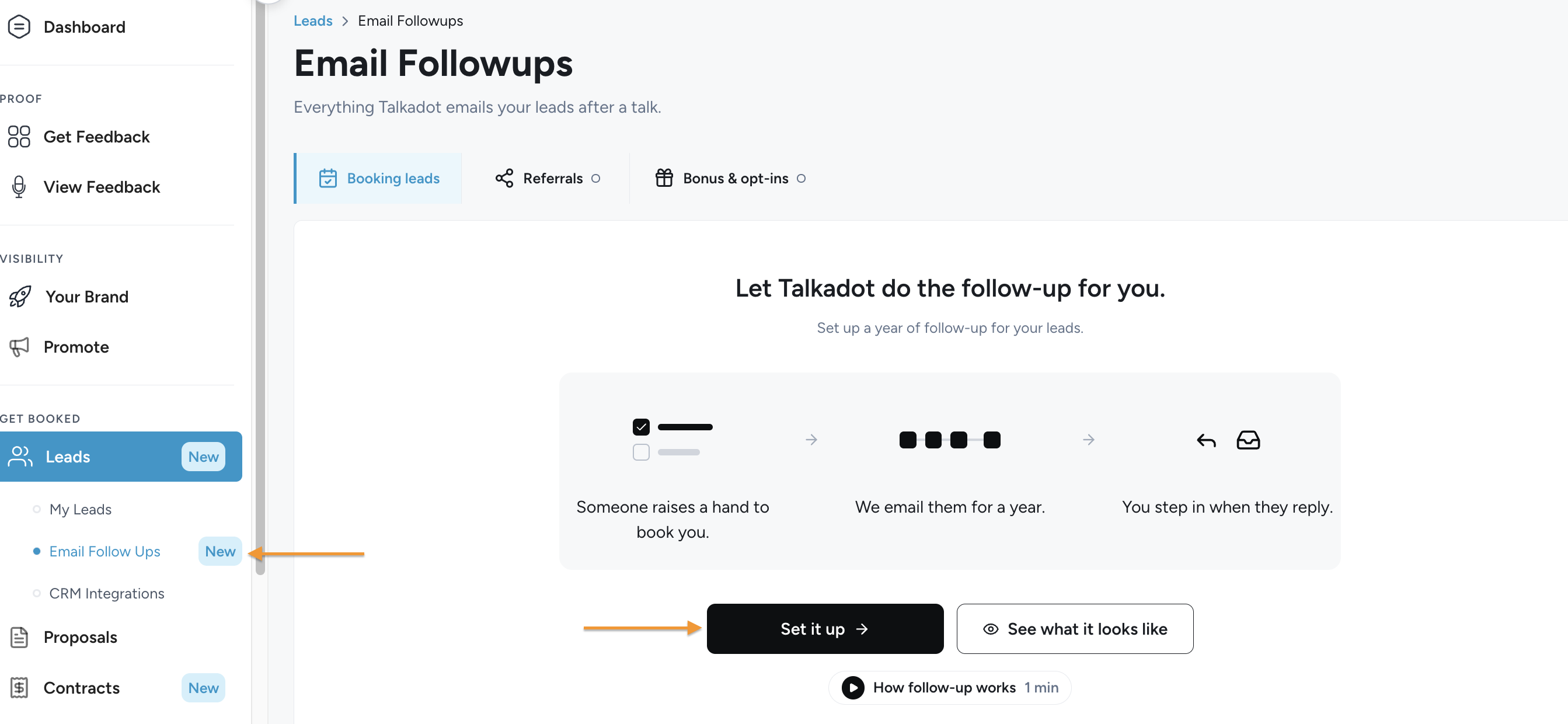
The Follow-up emails are sent to a speaker's booking leads for them. When someone on the survey says they'd like to book the speaker (you perhaps?), Talkadot sends them up to 12 emails over the course of a little more than a year, written in the speaker's voice and sent on the speaker's behalf.
The system pauses or stops on its own when the lead replies, clicks the speaker's calendar link, sends a booking inquiry, unsubscribes, or the email bounces. This is to make sure we are helping nurture business and outreach for you, but not getting in the way of actual communication! Nothing worse than emailing someone back, and then realizing they also received an automated follow-up at the same time!
Where to find the new Follow-ups:
- Leads → Email Followups, Booking tab: the setup, the on/off switch, four stage cards and a table of every lead in follow-up.
- Sending: emails still going out.
- Waiting for reply: every email has gone out.
- Waiting on you: the lead replied, may have clicked the calendar link, sent an inquiry, or the email bounced.
- Booked: the speaker marked them booked.
- The lead's side panel (click a row): what they said on the survey, every email to them, and Pause, Resume, Mark as booked and Not booked.
- Follow-up is part of Pro and Elite, but Lite and Essentials speakers get it during their free Pro trial.
Who gets follow-up
A lead joins when they answered "Yes, I do!" or "Possibly" to the "Would you like to book [the speaker] for a future speaking engagement?", left an email address, and the speaker's follow-up is on.
Leads who wrote something under "opportunity details" only join if our AI check reads it as a real booking opportunity. Leads who left it blank aren't checked and join as normal. It's the same AI check Talkadot already runs on every lead's opportunity details, so a lead who wrote "Great talk!" or just their name is left out.
They leads are left out of the follow-up sequence if any of these is true:
- They're marked Contacted or Archived, or were deleted.
- They already unsubscribed from this speaker's emails.
- They have a booking inquiry waiting.
- They already got one of the old follow-up emails.
- They're already in this speaker's follow-up under the same email address.
- It's the speaker's own email address.
- The speaker has reached their lead limit, however leads already in follow-up will finish their current sequence.
Referral leads ("I know someone") and email opt-ins don't join this follow-up.
When emails go out
New leads are collected into the follow-up sequence every morning, and emails go out at 7:30 AM Eastern. Email 1 goes the morning after the lead came in. Each later email goes a set number of days after the one before it actually went out, so a pause pushes everything after it back.
Default timing (though you can change this):
- Email 1 - The day after the talk
- Email 2 - 5 days after email 1
- Email 3 - 9 days after email 1
- Email 4 - 14 days after email 1
- Email 5 - 21 days after email 1
- Email 6 - 30 days after email 1
- Email 7 - 60 days after email 1
- Email 8 - 120 days after email 1
- Email 9 - 210 days after email 1
- Email 10 - 288 days after email 1
- Email 11 - 365 days after email 1
- Email 12 - 400 days after email 1
How to set up the follow-ups
When going to the Leads followup page, you can open the setup with Set up follow-up the first time, or Edit follow-up after that. It has three steps:
StepWhat you’ll doRepliesPicks the email address replies go to. Can add up to 3 people to BCC on every email. (Great if you have a management team)My VoiceOptional. Pastes up to 4,000 characters of your own writing, then click Write my emails. (The system will then replicate your tone and style!)EmailsReads and edits the 12 emails, then turns follow-up on.
Some of you may start with the follow-up already on, using the standard 12 emails that is to say: new speakers, once they enter their name during onboarding, and speakers who had the old booking email on. The standard emails aren't written in your voice.
To change that, you’ll need to paste your own writing in My Voice and then click Rewrite my emails.
My Voice only sets the voice. The writing you paste shapes the tone and phrasing, but it isn't read as instructions, so "make it 3 emails" or "mention my book" does nothing, and nothing in it (names, offers, links) is copied into the emails. To change how many emails there are or what they say, you’ll need to edit them in the Emails step.
In the Emails step, you can:
- edit an email's subject and wording;
- use Add field to put in a detail that fills in for each lead
- change an email's timing;
- remove an email, or add one (12 at most);
- restore an email's original wording;
- Restart the whole process.
Rewrite vs Start over
This is the one that may confuse people, so I wanted to address it here!
Going back to My Voice and clicking Rewrite my emails keeps everything that has been changed. Edited the sequence? Removed emails? Adjusted timing? All preserved.
Start over (in the Emails step's ⋯ menu) however, that throws it all away. You’ll revert to the default setup for the follow-up.
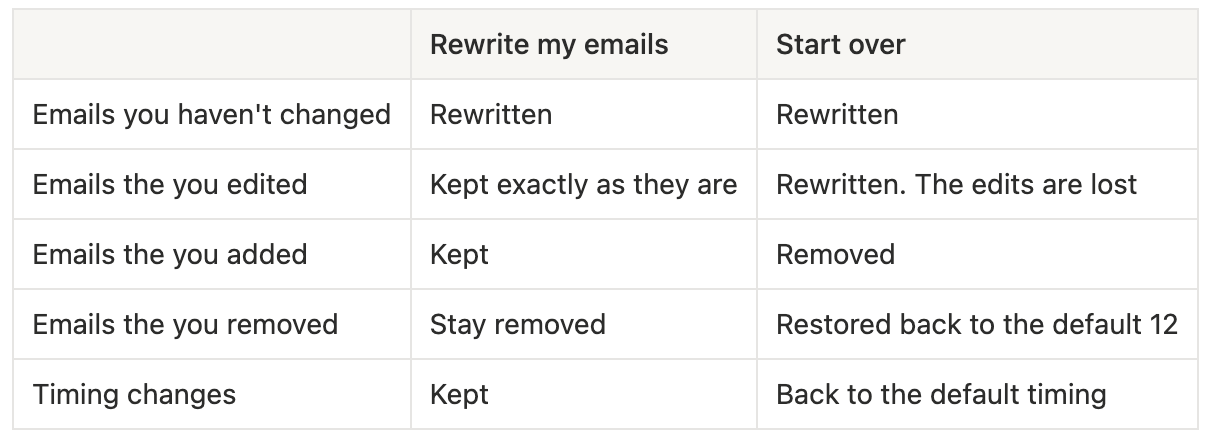
So if you edited email 3 for example, pasted new writing and clicked Rewrite, you’ll get fresh versions of every email except email 3, which stays as you wrote it. To get a fresh email 3, they click Restore original on it before rewriting, or use Start over.
What if I edit the follow-up while leads are already in the sequence?
- Changing the overall emails: (Edit follow-up, or a rewrite) only affects leads who join after the speaker saves. Leads already in follow-up keep getting the wording they started with.
- Changing one lead's emails: open the lead, then Edit on an upcoming email. That changes it for that lead only. From there, you can also change the timing for that specific lead, restore the original wording, or remove the email for that lead. Removing their last email ends their follow-up.
- Emails that have already gone out can't be changed.
- There's no way to apply an edit to everyone already in follow-up. In that instance you would have to edit each lead.
What happens once a lead is in follow-up
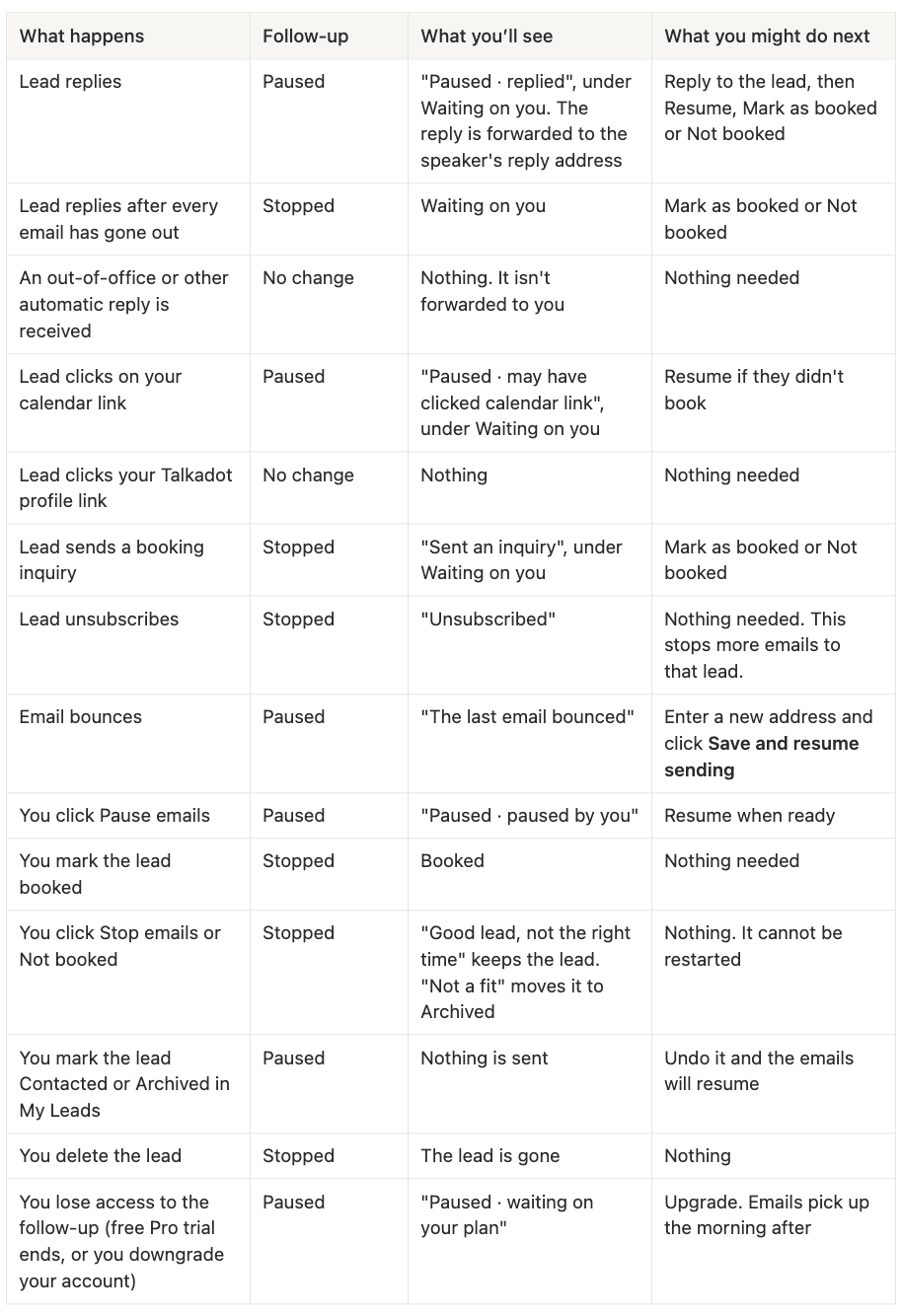
- Resume timing: after Resume, the next email waits its normal gap from the day when you resumed the sequence (at least until the next day). For instance, if email 7 has a 60-day wait, it goes 60 days after the sequence was resumed. The panel will show the date before you click.
- After an upgrade, paused leads pick up with whatever wait they had left.
- Bounced address: the email that bounced goes again to the new address the next day. The new address can't be one that already bounced, one that unsubscribed, your own email, or one another lead already uses. After 3 bounced addresses, a lead's address can't be changed again.
- Calendar link clicks only count when a person clicks. Email security scanners that open every link are ignored.
- Stopped is final. A stopped lead can't be restarted. Resume only works on paused leads.
What if you turn follow-up off?
New booking leads stop joining the sequence. You can then pick Let them finish (allowing leads already in follow-up get the rest of their emails) or Stop all now (this cannot be undone).
What each email includes by default
- They are sent from your name, via Talkadot. Replies go to a Talkadot address that forwards them to your reply address.
- It's signed "Sent on [your first name]'s behalf via Talkadot".
- The footer has an unsubscribe link and Talkadot's postal address.
When is an email is automatically skipped?
An email is skipped for a lead when:
- You removed sentences and left the subject or body empty ("Missing info");
- The email is too long once the lead's details are filled in ("Too long").
A skipped email doesn't stop follow-up. The lead moves on to the next email, and the side panel will show the skip and why.
Here’s a great quick overview from Arel:
Hope you all have fun! This is possibly our most asked for feature, and we couldn’t be more excited to get it into your hands.
Thanks!