Introduction to our new Website Widget!!
One of our most requested features has arrived!
.png)
Hello all!
Exciting news (if you’re reading this at the end of 2026), or potentially old news (if you live in some far flung future year like 2027)!
We now have an embeddable website widget! You can design it to look a bunch of different ways, displaying different metrics and it will automatically load with the most up to data available:
.png)
Testimonials, scores, and variety of sizes are available, as are different colour schemes! Some of these features and layouts are Pro and above only, but even on Lite you can access the Carousel layout displayed above.
So how does it work, and how do you put it on your website? Lets get to it!
First off, what does each layout show?
Here’s a handy chart for you:

Every template also carries a “Verified by Talkadot” badge and links to the speaker’s public profile. The Standing chip shows only rating and attendees until a visitor clicks it open.
Where does this data come from?
The stats come from the same stored numbers as the speaker’s public profile, but some are displayed differently here.
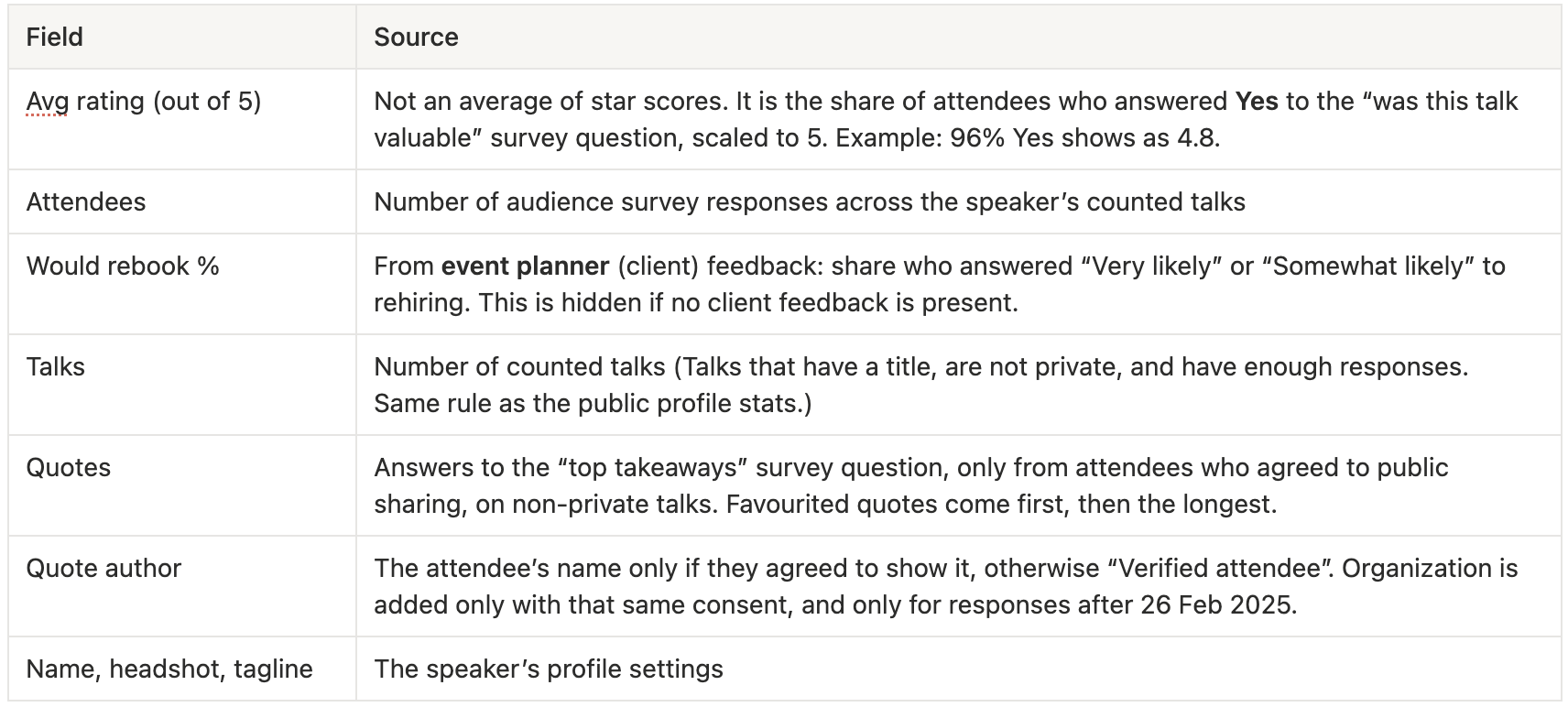
A lot of this information is the same as your Public Profile, however the Profile also shows things the widget never does: would-attend-again %, audience type, met objectives, engagement, the AI feedback summary, topics and the events table.
Both are hidden when the profile is set to private. If your Profile still has the old password-protected setting on, the widget will show nothing.
What does each plan have access to?
The data shown is the same on every plan. Plans only change which template, colours and logo you have access to.

The plan is checked every time the widget loads, not when the code is copied. This means that a speaker who downgrades from Pro to Lite keeps a working widget, but it will switch to Carousel, Neutral Light, logo on, with no need to re-install!
Now, speaking of install, how does that work? The good news is, that we have a guide for a bunch of different sites, right at the bottom of the Widget page!
Scroll down, and you’ll see a step by step guide to a bunch of different site builders:
.png)
Still can’t figure it out? Email me over at [email protected]. I’m not a website builder myself, but I’m always happy to help troubleshoot.
Common Questions

Until next time ya’ll! 🖖