Plan Overview and how to downgrade?
Quick look at the different plan features, and how to downgrade
.png)
Hello again!
I’ve mentioned ‘Downgrading’ plans a few times in the past, and so I thought it was time to give a full overview of what that means. At Talkadot we offer four membership levels*, Lite (sometimes referred to as ‘Forever Free’), Essentials, Pro, and Elite.
Each plan offers some different features, and in this Article I’ll be walk through what those are, and how to downgrade your account.
At the top though I want to flag that if you are on a Talkadot Pro Trial, such as the one you get automatically when you initially sign up, and you don’t want to upgrade to a paid plan, you don’t need to do anything. We don’t collect any payment information to sign, and at the end of a Trial the system will automatically transition your account to the Lite plan. We’ll never charge you for a paid membership unless you set it up yourself.
Now then, lets talk numbers. Specifically, Leads, Survey Codes, and Custom Questions. Any level plan can collect unlimited feedback and audience responses, but Leads are a different story. A Lead is specifically the personal and contact information of an audience member who stated they either wanted to hire you (booking lead), knows someone who might (referral lead), or simply wanted to stay up to date with news about you (email opt-in, basically leads to fill up your Newsletters).
Each plan has a different number of leads available to them, and for the paid plans those leads are based on the age of your account. Survey Codes work similarly, with each plan having a different number they can have in use at one time, but Survey Codes are also intended to be reusable so its a simple cap. Custom Questions aren’t available on the Lite plan, and but the number you can put on a single Survey Code is limited by which plan you are on. Please see the numbers for each below*:
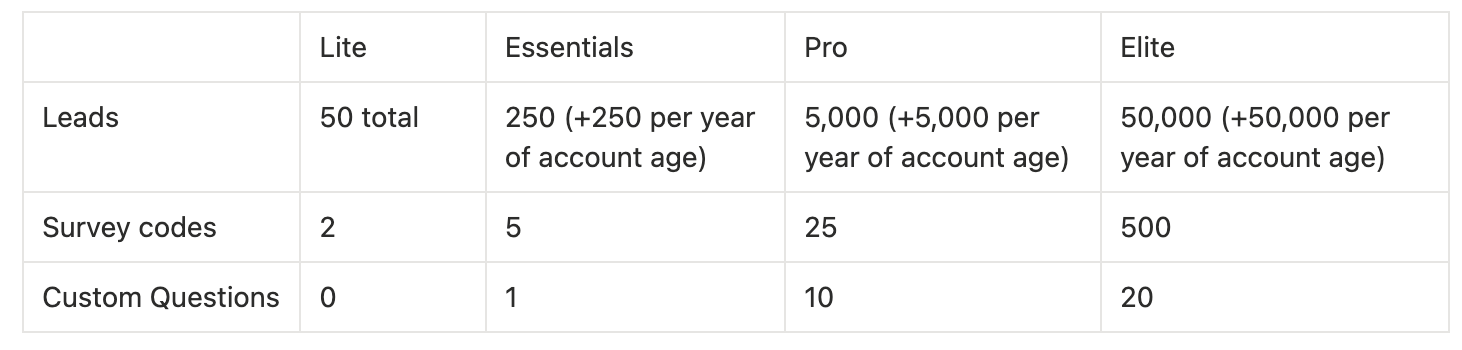
If you are above any of the above numbers when you downgrade, no data will be deleted, it will just cease to be accessible. For instance, if you are moving from Pro to Lite and you have 700 leads, any leads beyond the initial 50 will be inaccessible, although still present in your account.
Likewise, if you have more Survey Codes than are available, the additional Survey Codes will still be ‘stored’ on your account but they won’t be usable. So if you had 3 Survey Codes on Essentials, and went down to Lite, you’d only see two of them. If you deleted one of the two you still had access to, that third one would then automatically populate back into your list.
Okay, now lets talk features. this is where it gets a bit more complicated.
Elite only features are an Annual Data Strategy Report (basically we analyze all of your talk data and give you advice to better leverage your account), and 5 sub-account logins (these are intended to be used by management / support teams who need access to your account so they can do things like set up your events for you). Elite also has access to 150 proposals that they can generate per year. Elite has some additional customization options to allow editing direct wording of a few questions. Elite also has access to all features from the lower level plans.
Pro and above have access to Zapier Integration, as well as direct integration with Speakerflow, which allows you to automatically funnel your leads into a CRM for management. AI summaries built off of Audience responses are available on your Talk Reports (they require a sufficient amount of audience data to be constructed), and 50 proposals. They also can customize some of the wording on questions, but not all, and they can make the Contact Info questions required. Additionally, Pro has access to Automated Email Followups which will send a single email out to your leads. We think of these emails as keeping your foot in the door. I wouldn’t respect a response, but they should help you get a response from your follow-up later on!
Essentials has all the same features as the Lite plan, plus more leads and survey codes, and the ability to customize their plans with 1 custom question.
Now that that’s been covered, how does one go about Downgrading their plan, and what happens when the Downgrade happens?
The how depends on what sort of Downgrade you’re looking for. If you’re switching to the Lite plan, you can do that directly from the Account Settings > Payments & Plans page by scrolling down to where it Lite appears and selecting ‘Downgrade’:
.png)
This will automatically switch you to Lite on your renewal date.
However, if you’re looking to switch between paid plans, such as from Pro to Essentials, you’ll need to reach out to me over at [email protected] to help you get set up*. We’re working on making this automated as well, but at this time requires a change to be scheduled manually.
Once your downgrade is scheduled, it will automatically occur at your renewal date. If you have lost access to leads, you’ll see them greyed out on the ‘Leads’ page. Otherwise, your account is still completely functional, and you can keep using your Survey Codes (the ones that are still active) to collect feedback!
Additionally, your Public Profile, and your place in the Speaker Search are always available, and are not effected in anyway by what plan you are on.
Take care everyone!
*As of September 2026